

Put a star chart in your post.
Two widgets for blogs and READMEs: the star chart of any repo we track, and the Top 5 trending list. Each is one small picture that links back here.
Star chart of one repo
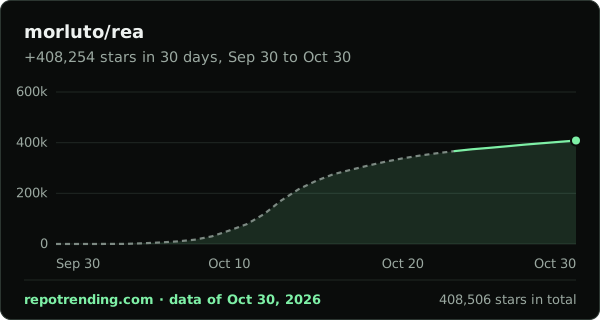
The last 30 days of total stars, with the stars gained over that time written above the line. Type a repo to change the snippets and the preview.
[](https://repotrending.com/repo/morluto/rea/) <a href="https://repotrending.com/repo/morluto/rea/"><img src="https://repotrending.com/embed/chart/morluto/rea.svg" alt="morluto/rea star history on RepoTrending" width="600" height="320" loading="lazy"></a> Top 5 trending
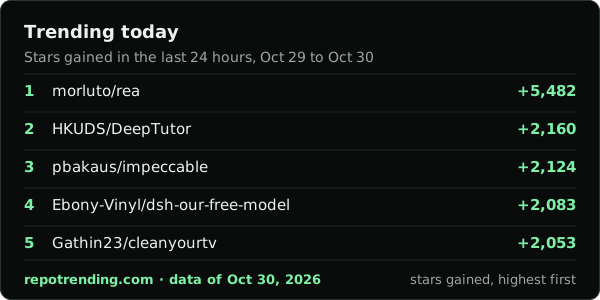
The five repos that gained the most stars today, this week or this month: the same lists as the home page, the week page and the month page. A list that does not have all its days yet says so on the picture.
[](https://repotrending.com/) <a href="https://repotrending.com/"><img src="https://repotrending.com/embed/top5/today.svg" alt="Trending today on RepoTrending" width="600" height="300" loading="lazy"></a> 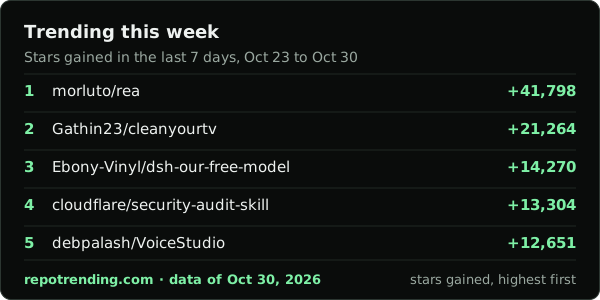
[](https://repotrending.com/this-week/) <a href="https://repotrending.com/this-week/"><img src="https://repotrending.com/embed/top5/week.svg" alt="Trending this week on RepoTrending" width="600" height="300" loading="lazy"></a> 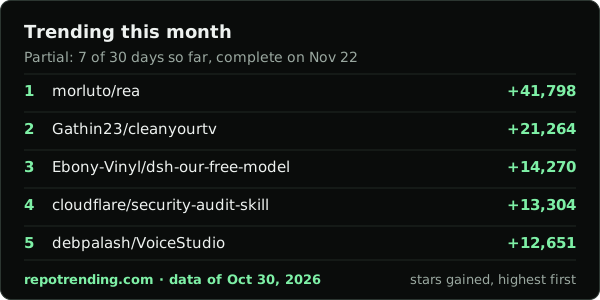
[](https://repotrending.com/this-month/) <a href="https://repotrending.com/this-month/"><img src="https://repotrending.com/embed/top5/month.svg" alt="Trending this month on RepoTrending" width="600" height="300" loading="lazy"></a> How it works
Every widget is a file made when the site is built, once a day, from the star counts we saved that day. There is no server behind it and nothing runs when your page loads: the browser fetches one SVG, and our host and your visitors' browsers keep it for up to an hour.
The picture is a dark card with its own background, so it reads the same on a white page, a dark page and a GitHub README in either theme. A light version would double the files on the site, so there is none yet.
The snippet wraps the picture in a link to the page the numbers come from: the repo's page for a chart, the ranking page for a Top 5. Please keep it. It is the credit we ask for, and it lets a reader see how the number is counted, which is written on How we rank.
Size, cache and cookies
| Question | Answer |
|---|---|
| Weight of one widget | The star chart of morluto/rea is 3.1 KB; the largest Top 5 is 2.8 KB. Every widget is held under 50 KB by a test. |
| Cache | Browsers and our host keep a file for up to an hour (Cache-Control: public, max-age=3600). |
| Cookies | None. No header of ours asks the browser to store anything. |
| Script | None. The picture holds text, lines and shapes only. |
| Counting visitors | We count nothing about who views a widget. Cloudflare serves the files and keeps its own network records, outside our code. See Privacy. |
What it can't do
- It only covers the 2,500 repos we track. A repo we do not track has no chart, and its address shows a broken picture.
- A repo needs two days of star counts before its line can be drawn. Until then the picture says when the chart appears.
- It can show yesterday's numbers. The data is rebuilt once a day, kept for an hour, and GitHub keeps its own copy of an image.
- The picture cannot be clicked on its own; the link comes from the snippet around it.
- It can't tell a real surge from bought stars, here or on the site.
Questions
How do I put a star chart in my README?
Paste the Markdown from this page into your README and replace the repo with yours. It is a picture that links back to the repo's page on RepoTrending. The picture exists for the 2,500 repos we track; if yours is not one of them, its address shows nothing.
Does a widget set cookies or track people who view it?
No. Each widget is one static picture file. We add no cookie, no script and no counter to it. The files are served by Cloudflare, which keeps its own network records for anything it serves; that is outside our code.
How often does it update?
Once a day, when the site is rebuilt after the daily star counts are saved. The data day is written at the bottom of every picture (now Oct 30, 2026). Browsers and our host keep a file for up to an hour, and GitHub keeps its own copy of an image and refreshes it on its own schedule, so a README can show yesterday's picture for a while.
Why a picture and not an iframe?
A picture loads from one cached file and cannot run anything on your page. It also works where an iframe does not: GitHub strips iframes from a README, and our site refuses to be framed on purpose. The cost is that the picture cannot be clicked on its own, so the snippet wraps it in a link.
Do I need permission, an account or a key?
No. There is nothing to sign up for. Please keep the link in the snippet: it is how your readers check the numbers, and it is the credit we ask for.
What does the dashed part of a chart mean?
For some repos the days before we started counting are worked out from GitHub's star history, counted back from our first count. Those days are drawn as a dashed grey line. The solid green line is our own daily count. Stars that people took back are not in GitHub's numbers, so the dashed part can run a little off.